
🔌
The provider is your choice
You decide at taskin init where the tasks live. A provider is a plugin installed on demand, and swapping it changes nothing else: the commands, the dashboard and the metrics stay the same.
A task management layer that doesn't tie you to where the tasks are kept. The same CLI, the same real-time dashboard and the same bridge to your AI agent — with the task in local markdown, in Redmine, in Jira or in GitHub Issues.
Taskin is the layer between you and your work queue. It gives you one vocabulary — create, start, pause, review, finish — and a set of tools on top of it: a CLI, a real-time dashboard, an MCP server for AI agents, and metrics derived from git history.
Where the tasks are kept is your decision, made once:
taskin init? Choose a task provider
❯ 📁 File System — markdown in a TASKS/ directory in your own repository
🔴 Redmine — issues over the REST API
🔵 Jira — issues over the REST API
🐙 GitHub Issues — issues in the repositoryThe choice goes into provider.type in .taskin.json, and every command respects it. A provider is a separate package installed on demand — you don't carry the Jira client around to use local markdown, or the other way round.
Where things stand
The File System provider is stable and is the default. Redmine, Jira and GitHub Issues are listed in the init registry as coming-soon: the architecture supports them and the contract is ready, but the packages haven't been published yet.
taskin dashboard opens a panel that reads tasks from the configured provider and follows changes over WebSocket — when someone runs taskin finish in the terminal, or an agent calls finish_task over MCP, the card changes state without a reload.
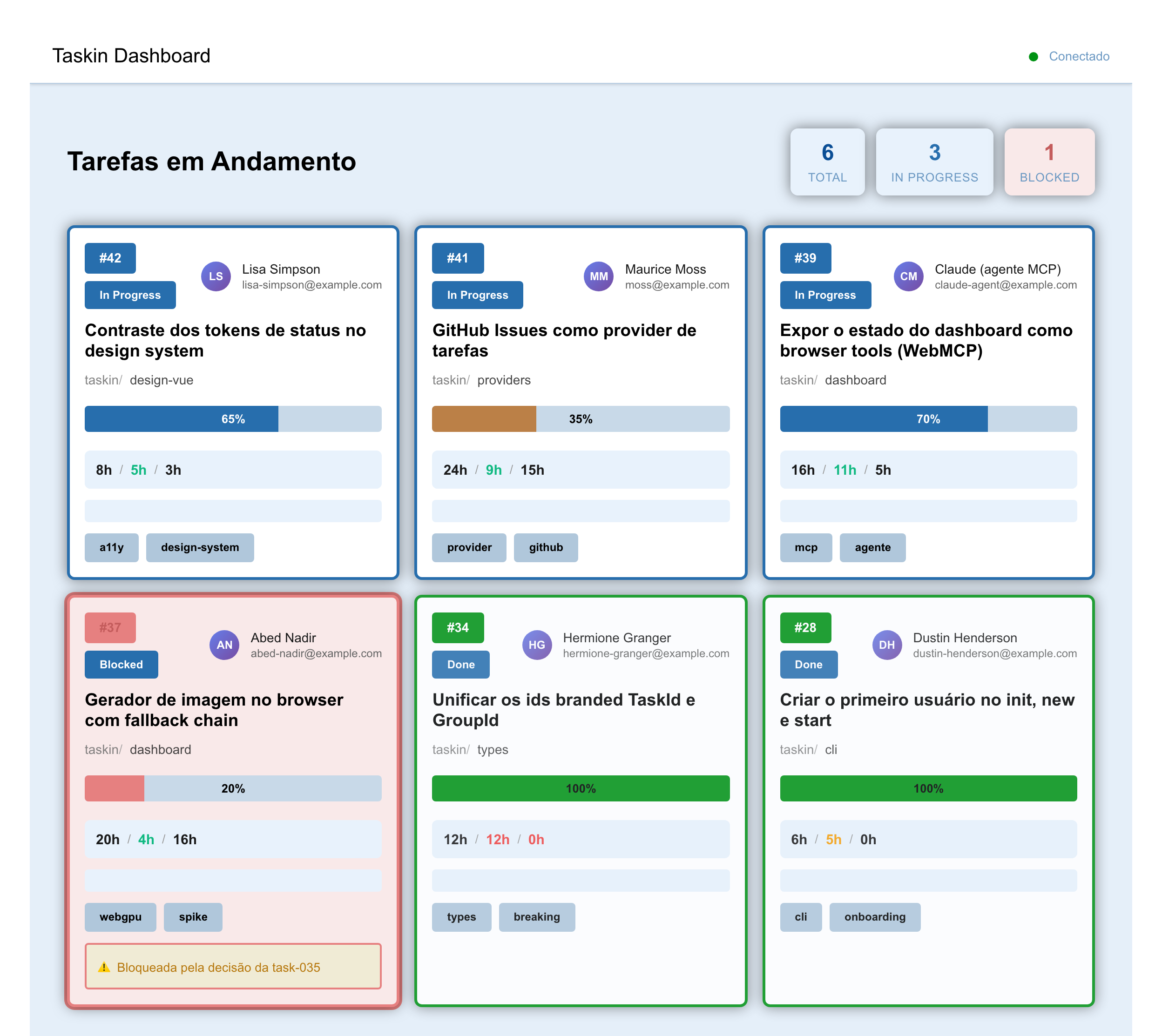
The names there are examples — including the agent, which is listed as an assignee on purpose: through the MCP server it picks up work from the same queue as the rest of the team.
How this image is generated
It comes from the component gallery, from the dashboard's LandingShowcase state, generated by dev/scripts/gerar-imagem-do-dashboard.ts — not a screenshot taken by hand. When the dashboard changes, run the script again.
The panel in this image is still in Portuguese
The Dashboard and TaskGrid components still have Portuguese strings baked in — they were missed when the rest of the packages were standardized on English. Tracked separately; the image gets regenerated once that lands.
A provider answers for six operations. That is all Taskin needs to know about your backend:
interface ITaskProvider<TTask extends Task = Task> {
  initialize: () => Promise<void>;
  findTask: (taskId: TaskId) => Promise<TTask | undefined>;
  getAllTasks: () => Promise<TTask[]>;
  updateTask: (task: TTask) => Promise<void>;
  createTask: (options: CreateTaskOptions) => Promise<CreateTaskResult<TTask>>;
  lint: (fix?: boolean) => Promise<LintResult>;
}
The generic TTask is the detail that prevents leakage: the file system provider adds content and filePath to a task, a Redmine one would add the issueId and the note history, and none of that shows up in the agnostic package. Anyone consuming plain Task keeps working with any provider.
ITaskManager sits on top with the state transitions and the named operations — startTask, finishTask, assignToGroup, setPriority, moveBefore, moveToTop, moveGroupToTop, nestGroup, setDifficulty and the rest — and is generic over the same shape. The CLI, the MCP server and the dashboard all go through it: the dashboard's WebSocket sends set-priority or assign-to-group, never a whole task to overwrite. On the prioritization board, the arrows, top, bottom and dragging send move-before / move-after (or move-group-before / move-group-after) with the first, last or neighbouring visible row as the reference — with a filter on, the top is the top of what you see — and the new numbers come back from the domain, the same rule taskin priority --before uses. Undo re-sends the previous values of only the tasks the move changed. Dropping a task on another of the same group creates a real subgroup, and dropping a group on another creates a parent with both inside — sent as create-group and nest-group, so the nesting survives a reload, up to four levels deep. A table, SUPERFICIES_DAS_OPERACOES, says where each operation is exposed — and adding an operation without deciding the three surfaces does not compile.
If you don't use an issue tracker, or you want the task travelling alongside the code, the File System provider keeps each one as markdown in your repository:
# Task 042 — Status token contrast

Status: in-progress
Type: chore
Assignee: sidartaveloso

## Description

The `--status-*-bg` tokens with white text fail WCAG AA.

## Tasks

- [x] Measure the contrast of each colour/text pair
- [ ] Decide between darkening the token or changing the text colour
The Assignee line holds the user's id from .taskin/.taskin-users.json, not the display name; taskin lint --fix rewrites a display name into the id.
Being a file in the repository, some things come for free: a change of scope shows up in the PR diff, the task follows the branch where the work is, conflicts are resolved with the tools you already use, and search is grep.
None of that is a Taskin requirement — it's what this provider offers. With Jira, you trade those properties for the ones Jira gives you.
The MCP server exposes the work queue as tools, and the agent that already reads your repository starts acting on it:
Three filters, the same on every surface: open (anything not finished), closed, and active — started and not finished, which is what you want on screen while work is happening.
With no filter at all, the list shows only the open tasks — in the CLI, in list_tasks and on the dashboard, because whoever opens the list wants to know what is left to do. To see every task, closed ones included: taskin list --all, all: true over MCP, or the All button on the dashboard. An explicit status filter (--status done, --closed, --active) replaces that default instead of adding to it — and, since it already narrows the list, it cannot be combined with --all.
Two more split the queue by difficulty: scored (already rated — what you prioritise) and unscored (the queue still waiting to be rated). On the dashboard they are a control of their own in the top bar, next to the search and the sort mode, and they apply to both screens, the Board and the Prioritization.
The free text — taskin list fix, text over MCP, the search box on the dashboard — matches id, title, type, status and assignee, the same rule everywhere. The dashboard keeps what you chose in the URL (?q=, ?sort=, ?score=, next to ?view= and ?filter=), so a reload or a shared link shows the same list in the same order. The unscored queue is worked from anywhere: taskin difficulty 042 3 in the terminal, set_difficulty for an agent, or the board itself — from 1 (trivial) to 5 (very hard).
you:    "finish task 042"
agent:  → finish_task(taskId: "042")
        → the task changes state, the commit goes out, the dashboard updates
The agent doesn't know — and doesn't need to know — whether that became an edited file or a REST call. The provider settles that.
The agent can also arrange the queue it works through. set_priority places a task by number, right before or after another one, or at the top or bottom of the queue, join_group / leave_group move it between groups, and move_group moves a whole group, its members together. create_group, nest_group and unnest_group put a group inside another one, or take it out. The terminal has the same operations — taskin priority 042 --before 017, taskin priority 042 --top, taskin group join 042 g-cli, taskin group move g-cli --top, taskin group nest g-auth g-cli — so nobody has to edit the metadata block by hand.
Registering the server takes one command:
taskin mcp-installIt writes .mcp.json at the project root, merges with whatever is already configured there, and then starts the server to check the entry works — a command that resolves to a different taskin answers happily, with the wrong set of tools, so answering is not the same as answering correctly.
| package | what it does |
|---|---|
taskin | The CLI: init, new, start, finish, lint, prioritize, priority, group, dashboard, mcp-install, mcp-server |
@opentask/taskin-types | Zod schemas and the domain types |
@opentask/taskin-task-manager | The state transitions and the ITaskProvider contract |
@opentask/taskin-file-system-provider | The default provider, in markdown |
@opentask/taskin-task-server-mcp | The Model Context Protocol server |
@opentask/taskin-task-server-ws | The WebSocket server behind real-time |
@opentask/taskin-dashboard | The Vue 3 panel |
@opentask/taskin-design-vue | The design system, and the mascot up there |
@opentask/ui-sense | Sensor components: face, pose and gestures |
You can use just the CLI. Or just task-manager, with a provider of your own, inside your own tool.
ui-sense behind it He's an octopus because Taskin does many things at once with the same body. And what sits at the top of this page is not an image: it's the Taskin component from the design system, actually running — it blinks on its own and follows your cursor.
He can also mirror a face. @opentask/ui-sense does face, pose and gesture detection in the browser itself, and the mascot is simply a consumer of that:
His other 16 moods are in the component gallery.